
Forum Replies Created
-
AuthorPosts
-
I didn’t actually notice this. pandas has updated to version 3.0. I’m happy you pointed it out. I can’t remember if that exact piece of code needs to ignore errors.
If you want to go through the notebook you can write “%pip install pandas==2.3.3” in a cell at the very very top, restart the kernel and then run it again. This will make you run the older version of pandas.
But rather, until I get this fixed in the notebook, see it as a challenge! Can you fix this? Can you make the code run anyway? 🙂
Hi Rahul,
I know that “Excel in Python” exists, but it’s not something I have looked into more. It’s a relatively new feature in Excel.
I’m not sure I would go this way, as having Python code in Excel cells seems like a recipe for quite convoluted Excel files – but if you do it in a mindful way, it could maybe help solve some problems that would otherwise not be possible in Excel.
I would love to do a course for all the main FE packages, but ETABS is the only one I know deeply enough to teach, unfortunately.
Hi Vineet,
The ETABS course is under development and will be a separate course. It will not be part of PfSE. But it will build on top of everything learned in PfSE – it will be targeted engineers who already know Python and etabs (a very niche course)
August 28, 2025 at 11:27 pm in reply to: Specifying Rendered Units using handcalcs & forallpeople #5051Hi Danny,
Really great question. Apologies for the late reply, but had to do a little research.
I have been annoyed by this before myself! But now I decided to finally look into it – and it seems there is really no truly elegant way of doing it.
You can see a similar discussion here: https://github.com/connorferster/forallpeople/issues/38
The issue is that it tries to be smart, and assume what units you want. So is often said about Python: “It’s second best at everything”. Mathcad is better for calculation templates, but can do a fraction of what Python can do.
It’s an open source project though and Connor is doing an amazing job maintaining it – I think he will also appreciate your feedback and input.
This is a very good point! These are the formulas from CCIP016. I’m as confused as you are.
I have not been able to find an answer to your question, but maybe someone else knows.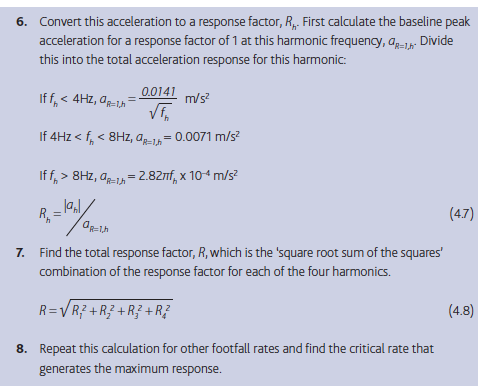
Hi Markus,
Thanks for bringing this to my attention!
The issue should be solved now.This is a very good question!
I haven’t used text books so much myself, as I mainly rely on online resources.A book a truly enjoyed though was the book Nature of Code – which is not based on Python but processing – which is a very visual language. There you build a a whole ecosystem of nature-behaviour (evolutionary algorithms, swarm behaviour, etc) and it’s an extremely entertaining book to read. Not a dull heavy theory book.
If you want dull and theory heavy I can also recommend “Clean Code” and “Algorithms and Data Structures”, but that’s really only if you wish to move more towards software development
April 28, 2025 at 10:47 am in reply to: Writing comments using “”” giving the string as output #4460Yes this is a nice way to write multiline comments 🙂
That is really odd. Thanks for bringing it to my attention – please let me know if it’s something that keeps happening!
Hi again,
I just tried on my end and without issues. Could have been a temporary streaming issue. Could you try to clear your browser cache or log in again in incognito mode and try again.?
Can you share a link to a google colab notebook? 🙂 And mark in that notebook exactly where it happens?
Try running ‘!pip install handcalcs’ in the notebook.
This so great to see. Thanks for sharing this. Super example of how you put this to use.
I have two comments.
1: I’m not sure if you’ve been through the section about float precision error. If you haven’t – get back to this comment when you have! But when you do the switch statement you current if for example fy_MPa == 250. While it will work fine in this example fy_MPa would be wise to treat like a float (because 250.01 would also be a possible value). Doing equality comparison between floats is not a great idea (due to float precision).
So instead you can check abs(250-fy_MPa) <tol where tol is small, for example tol=1e-6. Little less clear, but better practice.
2: when do the loop you don’t need really need the ‘i’ parameter. You can declare the variable name directly with
for overall_beam_depth_mm in beam_depths_mm:
with that being said. Very clean code. Nice variable names. Extremely clear what’s going on! Good job!
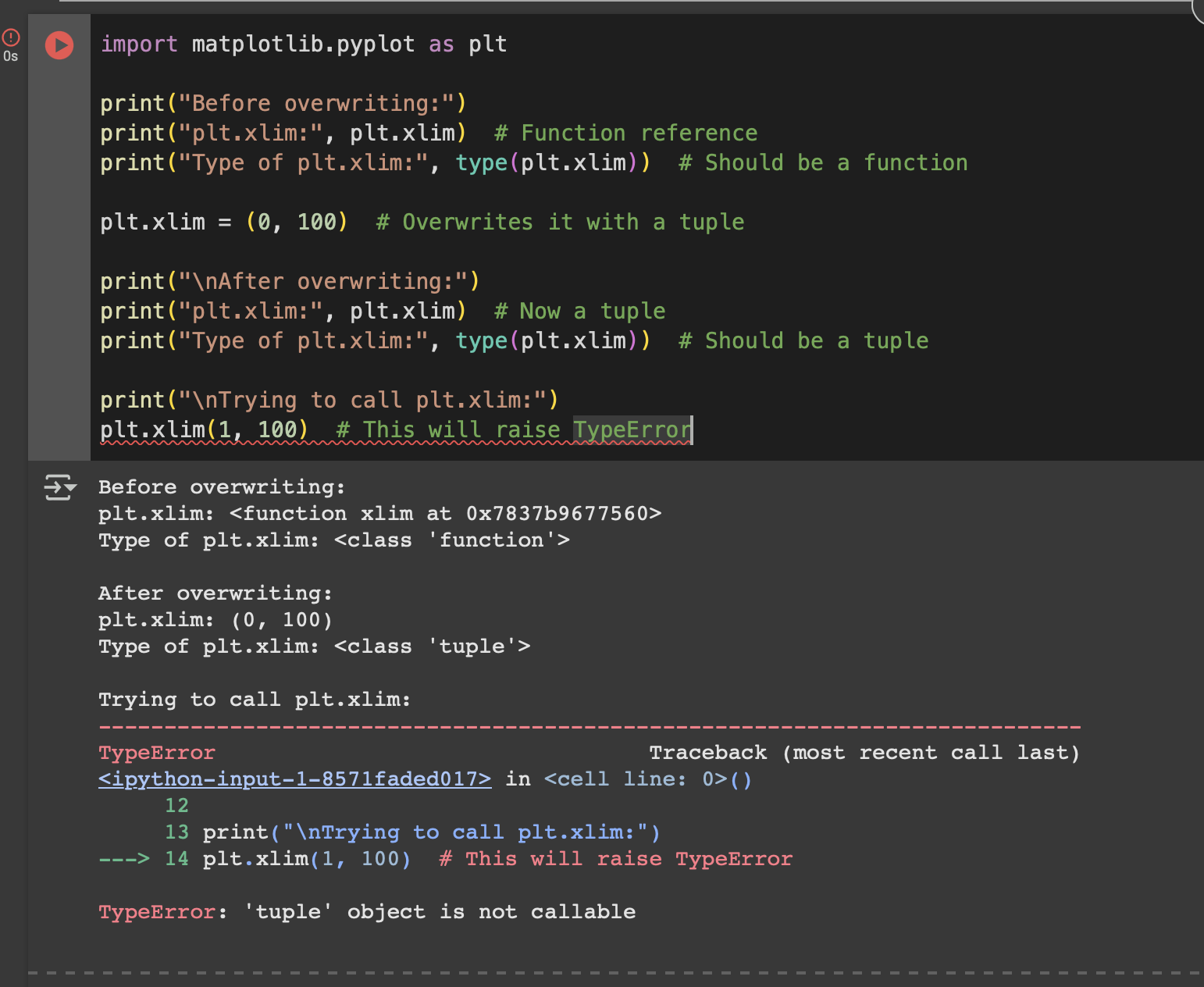
This is an amazing question, and it gets into some of the deep Python!
You accidentally overwrote the function plt.xlim by assigning a tuple to it (plt.xlim = (0, 100)). This replaced the function with a tuple, so when you later tried to call plt.xlim(1, 100), Python saw a tuple instead of a function and raised:
If you once type plt.xlim = 0,100 you will replace the function plt.xlim with a tuple.
You need to restart your kernel (Runtime->Restart Session) to redefine plt.xlim as the function it is.See example here
Hi Ali,
After the module you are currently in, you will be introduced to working locally with Python.
I may be wrong, but I don’t believe you can connect directly to your google drive this way using visual studio code. The code you show here is intended for Google Colab only.
Now that you are working locally, the world is open for you! You can simply just sync your google drive to your computer and work with the files as if they are local files. But have a look at the next submodule which will go a lot more into details with this! 🙂
February 2, 2025 at 9:53 pm in reply to: When highlighting a certain plot (advanced formatting) #3550Hi Patrick,
This is a really nice tip!!
And a super nice way to ensure that certain points of interest are always drawn on top.
Really appreciate you sharing this. Thanks!I see. Well spotted!!!
I will make sure to get this corrected. I appreciate you pointing it out.You solution seems good! Haven’t tested it, but this is also what I would do 🙂
Thanks for asking here. So let me know I understand your question wrong. 🙂
The explanation is that when you set index to ‘Section Name’, ‘Section Name’ is no longer a column, and will not have index 0 anymore. Let me show with an exampleimport pandas as pd # Create a DataFrame df = pd.DataFrame({ "A": [1, 2, 3, 4], "B": [5, 6, 7, 8], "C": [9, 10, 11, 12] }) # Accessing value using iloc before setting index value_iloc_before = df.iloc[1, 2] print("Using iloc before setting index:", value_iloc_before) print(df) print("============") # Set column 'A' as the index df_index = df.set_index("A") # Accessing value using iloc after setting index value_iloc_after = df_index.iloc[1, 1] print("Using iloc after setting index:", value_iloc_after) print(df_index)which gives
Using iloc before setting index: 10 A B C 0 1 5 9 1 2 6 10 2 3 7 11 3 4 8 12 ============ Using iloc after setting index: 10 B C A 1 5 9 2 6 10 3 7 11 4 8 12Hi Ruben,
Thanks for asking the question here. And it’s a really good question, and it had me quite puzzled when I first saw it.
Could it be that Python has not properly installed?I have opened access for you in the part of the course where I cover how you can install Anaconda (easy python install) or how you can install jupyter notebook directly (Check this video: https://www.youtube.com/watch?v=9tPS-7TWjq0). When you get to this part of the course I encourage that you work locally.
You should have access to this here now:
https://pythonforstructuralengineers.com/courses/python-for-structural-engineers/lessons/from-browser-to-desktop/topics/installing-anaconda/If you want to set things up properly for Visual Studio code try this guide here: https://www.youtube.com/watch?v=suAkMeWJ1yE
Let me know if this helps, otherwise we dive deeper! 🙂
Hi Ruben,
Thanks for asking the question here. And it’s a really good question, and it had me quite puzzled when I first saw it.
Could it be that Python has not properly installed?I have opened access for you in the part of the course where I cover how you can install Anaconda (easy python install) or how you can install jupyter notebook directly (Check this video: https://www.youtube.com/watch?v=9tPS-7TWjq0). When you get to this part of the course I encourage that you work locally.
You should have access to this here now:
https://pythonforstructuralengineers.com/courses/python-for-structural-engineers/lessons/from-browser-to-desktop/topics/installing-anaconda/If you want to set things up properly for Visual Studio code try this guide here: https://www.youtube.com/watch?v=suAkMeWJ1yE
Let me know if this helps, otherwise we dive deeper! 🙂
December 9, 2024 at 10:41 pm in reply to: Mathematical calculation formula appearance in IDE Spyder #3072Hi Vasileios,
I have not used Spyder myself, but it looks like it does not have the ability to render latex-formulas.
Most people who run jupyter notebooks locally use either VS Code (This is what I use), or Jupyter through Anaconda (https://www.anaconda.com/)I would recommend that you use one of these, and this problem should go away.
When you finish module 2, we will also look into how you can make a local install of Python with Anaconda.I have actually made a revision of the exercise after your comment here. Because you are completely right and it is a little misleading to ask you to solve this problem with a binary search algorithm.
You can check out the solutions to the exercises I also just uploaded.And this algorithm is so incredibly useful for so many types of optimization! Simple, robust and nice 😊
Regarding image upload – I was really surprised but apparently imgur doesn’t allow embedding – this here is also 100 times easier.
I have actually made a revision of the exercise after your comment here. Because you are completely right and it is a little misleading to ask you to solve this problem with a binary search algorithm.
You can check out the solutions to the exercises I also just uploaded.And this algorithm is so incredibly useful for so many types of optimization! Simple, robust and nice 😊
Regarding image upload – I was really surprised but apparently imgur doesn’t allow embedding – this here is also 100 times easier.
This is a really interesting question and nice work Thom!. You are completely right that a pure binary search algorithm would not work reliably on this problem! That would require a sorted list.
Our function looks like this

A straightforward approach for this case would be to first check if the target value lies within the bounds of 0.11 and 0.10 (in which case, we can search for d/b between 1 and 1.5), or/and within the bounds of 0.10 and 0.14 (in which case, we can search for d/b between 1.5 and 2.0). Now the function we search is just linear but if we had a more complex function binary search would be the best to go!
For a more unknown design space you can look into algorithms like gradient descent with multiple starting points, but they get quite computationally expensive.
I also recommend trying to implement a binary search algorithm to, for instance, find the height of a beam that precisely satisfies a given deflection criterion. While we probably don’t aim to design such hyper-optimized structures, it can be an interesting metric to understand. How far is my current design from meeting the benchmark?
And thanks showing me that uploading images was a pain. Just added the functionality to upload images easily 🙂
-
This reply was modified 1 year, 12 months ago by
 Timo Harboe-Zollner.
-
This reply was modified 1 year, 12 months ago by Timo Harboe-Zollner.
-
This reply was modified 1 year, 12 months ago by Timo Harboe-Zollner.
-
This reply was modified 1 year, 12 months ago by Timo Harboe-Zollner.
-
This reply was modified 1 year, 12 months ago by Timo Harboe-Zollner.
-
This reply was modified 1 year, 12 months ago by Timo Harboe-Zollner.
Hi Deepak,
Yes, I do plan on adding more content to the course based on the requests I receive.
And you have lifetime access – so if there is an addition of anything, I’ll make sure to notify you as well.
Please, when you get to the end of the course, let me know if there is infomation and knowledge that you feel is missing, and I’ll see what I can do.My key goal with the course is to give you enough knowledge to no longer need the course to progress.
I show how to use AI such at ChatGPT and Claude as assistants to help you on that journey.Hope this answers you question.
-
This reply was modified 1 year, 12 months ago by
-
AuthorPosts